本稿は SaaS型Webアプリ診断ツール「AeyeScan」を運営している株式会社エーアイセキュリティラボが、セキュリティテストの自動化、脆弱性診断の内製化、AI/機械学習などの技術情報の共有を目的とした記事です。
AeyeScan自動巡回エンジン開発担当の安西です。
近年、SPA(シングルページアプリケーション)の技術を使用して構築されたサイトを見かける頻度が急速に増えてきました。AeyeScan はブラウザベースのクローラーを搭載しているため、SPA も高精度で巡回することが可能です。
本記事では「OWASP Juice Shop」を例に AeyeScan の自動巡回技術の一部を解説します。
●OWASP Juice Shop とは
OWASP Juice Shopはセキュリティ教育やセキュリティツールの性能検証などを活用目的とするオープンソースの脆弱な Webアプリです。SPAフレームワークの Angular を使用しており、以下の技術的特徴があります。
・フォームに formタグが無い
・フレームワークの独自タグを使用している
・マウス操作やキー押下が必要
・CAPTCHA突破が必要
・モーダルが多い
●フォームに formタグが無い
従来型の Webアプリは入力フォームの内容を formタグで括るのが一般的です。
【従来型のシンプルなログインフォーム】
<form action="login.php" method="post">
ユーザID:<input type="text" name="user_id"/>
パスワード:<input type="password" name="password"/>
<input type="submit" value="ログイン"/>
</form>
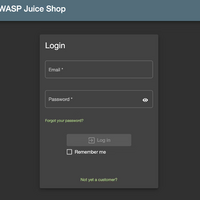
一方、SPA では入力フォームを formタグで括らないケースが多くあります。OWASP Juice Shop でも formタグは使用されていません。
【OWASP Juice Shop のログインフォーム】

【OWASP Juice Shop のログインフォームの HTML】
<div _ngcontent-qkp-c158="" id="login-form" class="form-container"><mat-form-field _ngcontent-qkp-c158="" color="accent" appearance="outline" class="mat-form-field ng-tns-c118-7 mat-accent mat-form-field-type-mat-input mat-form-field-appearance-outline mat-form-field-can-float mat-form-field-has-label mat-form-field-hide-placeholder ng-untouched ng-pristine ng-invalid ng-star-inserted"><div class="mat-form-field-wrapper ng-tns-c118-7"><div class="mat-form-field-flex ng-tns-c118-7"><div class="mat-form-field-outline ng-tns-c118-7 ng-star-inserted"><div class="mat-form-field-outline-start ng-tns-c118-7" style="width: 5.5px;"></div><div class="mat-form-field-outline-gap ng-tns-c118-7" style="width: 42.25px;"></div><div class="mat-form-field-outline-end ng-tns-c118-7"></div></div><div class="mat-form-field-outline mat-form-field-outline-thick ng-tns-c118-7 ng-star-inserted"><div class="mat-form-field-outline-start ng-tns-c118-7" style="width: 5.5px;"></div><div class="mat-form-field-outline-gap ng-tns-c118-7" style="width: 42.25px;"></div><div class="mat-form-field-outline-end ng-tns-c118-7"></div></div><!----><!----><!----><div class="mat-form-field-infix ng-tns-c118-7"><input _ngcontent-qkp-c158="" id="email" name="email" matinput="" aria-label="Text field for the login email" class="mat-input-element mat-form-field-autofill-control ng-tns-c118-7 ng-untouched ng-pristine ng-invalid cdk-text-field-autofill-monitored" required="" data-placeholder="" aria-required="true"><span class="mat-form-field-label-wrapper ng-tns-c118-7"><label class="mat-form-field-label ng-tns-c118-7 mat-empty mat-form-field-empty mat-accent ng-star-inserted" id="mat-form-field-label-3" for="email" aria-owns="email"><!----><mat-label _ngcontent-qkp-c158="" translate="" class="ng-tns-c118-7 ng-star-inserted">Email</mat-label><!----><span aria-hidden="true" class="mat-placeholder-required mat-form-field-required-marker ng-tns-c118-7 ng-star-inserted"> *</span><!----></label><!----></span></div><!----></div><!----><div class="mat-form-field-subscript-wrapper ng-tns-c118-7"><!----><div class="mat-form-field-hint-wrapper ng-tns-c118-7 ng-trigger ng-trigger-transitionMessages ng-star-inserted" style="opacity: 1; transform: translateY(0%);"><!----><div class="mat-form-field-hint-spacer ng-tns-c118-7"></div></div><!----></div></div></mat-form-field><mat-form-field _ngcontent-qkp-c158="" color="accent" appearance="outline" class="mat-form-field ng-tns-c118-8 mat-accent mat-form-field-type-mat-input mat-form-field-appearance-outline mat-form-field-can-float mat-form-field-has-label mat-form-field-hide-placeholder ng-untouched ng-pristine ng-invalid ng-star-inserted"><div class="mat-form-field-wrapper ng-tns-c118-8"><div class="mat-form-field-flex ng-tns-c118-8"><div class="mat-form-field-outline ng-tns-c118-8 ng-star-inserted"><div class="mat-form-field-outline-start ng-tns-c118-8" style="width: 5.5px;"></div><div class="mat-form-field-outline-gap ng-tns-c118-8" style="width: 63.25px;"></div><div class="mat-form-field-outline-end ng-tns-c118-8"></div></div><div class="mat-form-field-outline mat-form-field-outline-thick ng-tns-c118-8 ng-star-inserted"><div class="mat-form-field-outline-start ng-tns-c118-8" style="width: 5.5px;"></div><div class="mat-form-field-outline-gap ng-tns-c118-8" style="width: 63.25px;"></div><div class="mat-form-field-outline-end ng-tns-c118-8"></div></div><!----><!----><!----><div class="mat-form-field-infix ng-tns-c118-8"><input _ngcontent-qkp-c158="" id="password" name="password" matinput="" aria-label="Text field for the login password" class="mat-input-element mat-form-field-autofill-control ng-tns-c118-8 ng-untouched ng-pristine ng-invalid cdk-text-field-autofill-monitored" type="password" required="" data-placeholder="" aria-required="true"><span class="mat-form-field-label-wrapper ng-tns-c118-8"><label class="mat-form-field-label ng-tns-c118-8 mat-empty mat-form-field-empty mat-accent ng-star-inserted" id="mat-form-field-label-5" for="password" aria-owns="password"><!----><mat-label _ngcontent-qkp-c158="" translate="" class="ng-tns-c118-8 ng-star-inserted">Password</mat-label><!----><span aria-hidden="true" class="mat-placeholder-required mat-form-field-required-marker ng-tns-c118-8 ng-star-inserted"> *</span><!----></label><!----></span></div><div class="mat-form-field-suffix ng-tns-c118-8 ng-star-inserted"><button _ngcontent-qkp-c158="" mat-icon-button="" matsuffix="" aria-label="Button to display the password" mattooltipposition="right" class="mat-focus-indicator mat-tooltip-trigger mat-icon-button mat-button-base ng-tns-c118-8 ng-star-inserted" aria-describedby="cdk-describedby-message-1" cdk-describedby-host="0"><span class="mat-button-wrapper"><svg _ngcontent-qkp-c158="" aria-label="Eye" class="svg-inline--fa fa-eye fa-w-18" aria-hidden="true" focusable="false" data-prefix="fas" data-icon="eye" role="img" xmlns="http://www.w3.org/2000/svg" viewBox="0 0 576 512" data-fa-i2svg=""><path fill="currentColor" d="M572.52 241.4C518.29 135.59 410.93 64 288 64S57.68 135.64 3.48 241.41a32.35 32.35 0 0 0 0 29.19C57.71 376.41 165.07 448 288 448s230.32-71.64 284.52-177.41a32.35 32.35 0 0 0 0-29.19zM288 400a144 144 0 1 1 144-144 143.93 143.93 0 0 1-144 144zm0-240a95.31 95.31 0 0 0-25.31 3.79 47.85 47.85 0 0 1-66.9 66.9A95.78 95.78 0 1 0 288 160z"></path></svg><!-- <i _ngcontent-qkp-c158="" aria-label="Eye" class="fas fa-eye"></i> Font Awesome fontawesome.com --></span><span matripple="" class="mat-ripple mat-button-ripple mat-button-ripple-round"></span><span class="mat-button-focus-overlay"></span></button><!----><!----><!----></div><!----></div><!----><div class="mat-form-field-subscript-wrapper ng-tns-c118-8"><!----><div class="mat-form-field-hint-wrapper ng-tns-c118-8 ng-trigger ng-trigger-transitionMessages ng-star-inserted" style="opacity: 1; transform: translateY(0%);"><!----><div class="mat-form-field-hint-spacer ng-tns-c118-8"></div></div><!----></div></div></mat-form-field><a _ngcontent-qkp-c158="" routerlink="/forgot-password" translate="" class="primary-link forgot-pw" href="#/forgot-password">Forgot your password?</a><button _ngcontent-qkp-c158="" type="submit" id="loginButton" mat-raised-button="" color="primary" aria-label="Login" class="mat-focus-indicator mat-raised-button mat-button-base mat-primary mat-button-disabled" disabled="true"><span class="mat-button-wrapper"><mat-icon _ngcontent-qkp-c158="" role="img" class="mat-icon notranslate material-icons mat-icon-no-color" aria-hidden="true" data-mat-icon-type="font"> exit_to_app </mat-icon> Log in </span><span matripple="" class="mat-ripple mat-button-ripple"></span><span class="mat-button-focus-overlay"></span></button><mat-checkbox _ngcontent-qkp-c158="" id="rememberMe" class="mat-checkbox mat-accent ng-untouched ng-pristine ng-valid"><label class="mat-checkbox-layout" for="rememberMe-input"><span class="mat-checkbox-inner-container"><input type="checkbox" class="mat-checkbox-input cdk-visually-hidden" id="rememberMe-input" tabindex="0" aria-label="Checkbox to stay logged in or not logged in" aria-checked="false"><span matripple="" class="mat-ripple mat-checkbox-ripple mat-focus-indicator"><span class="mat-ripple-element mat-checkbox-persistent-ripple"></span></span><span class="mat-checkbox-frame"></span><span class="mat-checkbox-background"><svg version="1.1" focusable="false" viewBox="0 0 24 24" xml:space="preserve" aria-hidden="true" class="mat-checkbox-checkmark"><path fill="none" stroke="white" d="M4.1,12.7 9,17.6 20.3,6.3" class="mat-checkbox-checkmark-path"></path></svg><span class="mat-checkbox-mixedmark"></span></span></span><span class="mat-checkbox-label"><span style="display: none;"> </span> Remember me </span></label></mat-checkbox><!----><!----><div _ngcontent-qkp-c158="" id="newCustomerLink"><a _ngcontent-qkp-c158="" routerlink="/register" translate="" class="primary-link" href="#/register">Not yet a customer?</a></div></div>
多くの自動巡回ツールは、formタグを解析し action属性の URL に input要素などのパラメータ情報を付加して POST するという方法でサイトを巡回します。
<form action="login.php" method="post">
ユーザID:<input type="text" name="user_id"/>
パスワード:<input type="password" name="password"/>
<input type="submit" value="ログイン"/>
</form>
↓
POST /login.php HTTP/1.1
略
user_id=testuser&password=testpass
しかし、formタグの無いサイトではこの方法は上手く動作しません。
<div _ngcontent-qkp-c158="" id="login-form" class="form-container"><mat-form-field _ngcontent-qkp-c158="" color="accent" appearance="outline" class="mat-form-field ng-tns-c118-7 mat-accent mat-form-field-type-mat-input mat-form-field-appearance-outline mat-form-field-can-float mat-form-field-has-label mat-form-field-hide-placeholder ng-untouched ng-pristine ng-invalid ng-star-inserted"><div class="mat-form-field-wrapper ng-tns-c118-7"><div class="mat-form-field-flex ng-tns-c118-7"><div class="mat-form-field-outline ng-tns-c118-7 ng-star-inserted"><div class="mat-form-field-outline-start ng-tns-c118-7" style="width: 5.5px;"></div><div class="mat-form-field-outline-gap ng-tns-c118-7" style="width: 42.25px;"></div><div class="mat-form-field-outline-end ng-tns-c118-7"></div></div><div class="mat-form-field-outline mat-form-field-outline-thick ng-tns-c118-7 ng-star-inserted"><div class="mat-form-field-outline-start ng-tns-c118-7" style="width: 5.5px;"></div><div class="mat-form-field-outline-gap ng-tns-c118-7" style="width: 42.25px;"></div><div class="mat-form-field-outline-end ng-tns-c118-7"></div></div><!----><!----><!----><div class="mat-form-field-infix ng-tns-c118-7"><input _ngcontent-qkp-c158="" id="email" name="email" matinput="" aria-label="Text field for the login email" class="mat-input-element mat-form-field-autofill-control ng-tns-c118-7 ng-untouched ng-pristine ng-invalid cdk-text-field-autofill-monitored" required="" data-placeholder="" aria-required="true"><span class="mat-form-field-label-wrapper ng-tns-c118-7"><label class="mat-form-field-label ng-tns-c118-7 mat-empty mat-form-field-empty mat-accent ng-star-inserted" id="mat-form-field-label-3" for="email" aria-owns="email"><!----><mat-label _ngcontent-qkp-c158="" translate="" class="ng-tns-c118-7 ng-star-inserted">Email</mat-label><!----><span aria-hidden="true" class="mat-placeholder-required mat-form-field-required-marker ng-tns-c118-7 ng-star-inserted"> *</span><!----></label><!----></span></div><!----></div><!----><div class="mat-form-field-subscript-wrapper ng-tns-c118-7"><!----><div class="mat-form-field-hint-wrapper ng-tns-c118-7 ng-trigger ng-trigger-transitionMessages ng-star-inserted" style="opacity: 1; transform: translateY(0%);"><!----><div class="mat-form-field-hint-spacer ng-tns-c118-7"></div></div><!----></div></div></mat-form-field><mat-form-field _ngcontent-qkp-c158="" color="accent" appearance="outline" class="mat-form-field ng-tns-c118-8 mat-accent mat-form-field-type-mat-input mat-form-field-appearance-outline mat-form-field-can-float mat-form-field-has-label mat-form-field-hide-placeholder ng-untouched ng-pristine ng-invalid ng-star-inserted"><div class="mat-form-field-wrapper ng-tns-c118-8"><div class="mat-form-field-flex ng-tns-c118-8"><div class="mat-form-field-outline ng-tns-c118-8 ng-star-inserted"><div class="mat-form-field-outline-start ng-tns-c118-8" style="width: 5.5px;"></div><div class="mat-form-field-outline-gap ng-tns-c118-8" style="width: 63.25px;"></div><div class="mat-form-field-outline-end ng-tns-c118-8"></div></div><div class="mat-form-field-outline mat-form-field-outline-thick ng-tns-c118-8 ng-star-inserted"><div class="mat-form-field-outline-start ng-tns-c118-8" style="width: 5.5px;"></div><div class="mat-form-field-outline-gap ng-tns-c118-8" style="width: 63.25px;"></div><div class="mat-form-field-outline-end ng-tns-c118-8"></div></div><!----><!----><!----><div class="mat-form-field-infix ng-tns-c118-8"><input _ngcontent-qkp-c158="" id="password" name="password" matinput="" aria-label="Text field for the login password" class="mat-input-element mat-form-field-autofill-control ng-tns-c118-8 ng-untouched ng-pristine ng-invalid cdk-text-field-autofill-monitored" type="password" required="" data-placeholder="" aria-required="true"><span class="mat-form-field-label-wrapper ng-tns-c118-8"><label class="mat-form-field-label ng-tns-c118-8 mat-empty mat-form-field-empty mat-accent ng-star-inserted" id="mat-form-field-label-5" for="password" aria-owns="password"><!----><mat-label _ngcontent-qkp-c158="" translate="" class="ng-tns-c118-8 ng-star-inserted">Password</mat-label><!----><span aria-hidden="true" class="mat-placeholder-required mat-form-field-required-marker ng-tns-c118-8 ng-star-inserted"> *</span><!----></label><!----></span></div><div class="mat-form-field-suffix ng-tns-c118-8 ng-star-inserted"><button _ngcontent-qkp-c158="" mat-icon-button="" matsuffix="" aria-label="Button to display the password" mattooltipposition="right" class="mat-focus-indicator mat-tooltip-trigger mat-icon-button mat-button-base ng-tns-c118-8 ng-star-inserted" aria-describedby="cdk-describedby-message-1" cdk-describedby-host="0"><span class="mat-button-wrapper"><svg _ngcontent-qkp-c158="" aria-label="Eye" class="svg-inline--fa fa-eye fa-w-18" aria-hidden="true" focusable="false" data-prefix="fas" data-icon="eye" role="img" xmlns="http://www.w3.org/2000/svg" viewBox="0 0 576 512" data-fa-i2svg=""><path fill="currentColor" d="M572.52 241.4C518.29 135.59 410.93 64 288 64S57.68 135.64 3.48 241.41a32.35 32.35 0 0 0 0 29.19C57.71 376.41 165.07 448 288 448s230.32-71.64 284.52-177.41a32.35 32.35 0 0 0 0-29.19zM288 400a144 144 0 1 1 144-144 143.93 143.93 0 0 1-144 144zm0-240a95.31 95.31 0 0 0-25.31 3.79 47.85 47.85 0 0 1-66.9 66.9A95.78 95.78 0 1 0 288 160z"></path></svg><!-- <i _ngcontent-qkp-c158="" aria-label="Eye" class="fas fa-eye"></i> Font Awesome fontawesome.com --></span><span matripple="" class="mat-ripple mat-button-ripple mat-button-ripple-round"></span><span class="mat-button-focus-overlay"></span></button><!----><!----><!----></div><!----></div><!----><div class="mat-form-field-subscript-wrapper ng-tns-c118-8"><!----><div class="mat-form-field-hint-wrapper ng-tns-c118-8 ng-trigger ng-trigger-transitionMessages ng-star-inserted" style="opacity: 1; transform: translateY(0%);"><!----><div class="mat-form-field-hint-spacer ng-tns-c118-8"></div></div><!----></div></div></mat-form-field><a _ngcontent-qkp-c158="" routerlink="/forgot-password" translate="" class="primary-link forgot-pw" href="#/forgot-password">Forgot your password?</a><button _ngcontent-qkp-c158="" type="submit" id="loginButton" mat-raised-button="" color="primary" aria-label="Login" class="mat-focus-indicator mat-raised-button mat-button-base mat-primary mat-button-disabled" disabled="true"><span class="mat-button-wrapper"><mat-icon _ngcontent-qkp-c158="" role="img" class="mat-icon notranslate material-icons mat-icon-no-color" aria-hidden="true" data-mat-icon-type="font"> exit_to_app </mat-icon> Log in </span><span matripple="" class="mat-ripple mat-button-ripple"></span><span class="mat-button-focus-overlay"></span></button><mat-checkbox _ngcontent-qkp-c158="" id="rememberMe" class="mat-checkbox mat-accent ng-untouched ng-pristine ng-valid"><label class="mat-checkbox-layout" for="rememberMe-input"><span class="mat-checkbox-inner-container"><input type="checkbox" class="mat-checkbox-input cdk-visually-hidden" id="rememberMe-input" tabindex="0" aria-label="Checkbox to stay logged in or not logged in" aria-checked="false"><span matripple="" class="mat-ripple mat-checkbox-ripple mat-focus-indicator"><span class="mat-ripple-element mat-checkbox-persistent-ripple"></span></span><span class="mat-checkbox-frame"></span><span class="mat-checkbox-background"><svg version="1.1" focusable="false" viewBox="0 0 24 24" xml:space="preserve" aria-hidden="true" class="mat-checkbox-checkmark"><path fill="none" stroke="white" d="M4.1,12.7 9,17.6 20.3,6.3" class="mat-checkbox-checkmark-path"></path></svg><span class="mat-checkbox-mixedmark"></span></span></span><span class="mat-checkbox-label"><span style="display: none;"> </span> Remember me </span></label></mat-checkbox><!----><!----><div _ngcontent-qkp-c158="" id="newCustomerLink"><a _ngcontent-qkp-c158="" routerlink="/register" translate="" class="primary-link" href="#/register">Not yet a customer?</a></div></div>
↓
リクエストを生成できない
AeyeScan では、ブラウザを実際に起動し、表示された入力フォームに対して値を入力、ボタンを押下することによってこの課題を解決しています。
以下のような Selenium のテストスクリプトを自動で生成するイメージが近いです。
# ログインIDを入力
login_id = driver.find_element_by_id("email")
login_id.send_keys("指定されたログインID")
# パスワードを入力
password = driver.find_element_by_id("password")
password.send_keys("指定されたパスワード")
# ログインボタンをクリック
login_btn = driver.find_element_by_id("loginButton")
login_btn.click()
スクリプトを自動生成し、自動実行する。この繰り返しにより、ブラウザベースの自動巡回を実現しています。
●フレームワークの独自タグを使用している
ブラウザベースの自動巡回では、入力可能なフォーム要素や、押下できるボタンを探すことが課題となります。
探索手法はいくつかありますが、全てのタグを対象に無条件に試行する手法では速度面の問題が発生するため、対象タグを絞り込む必要があります。
例えば、
・selectタグ、inputタグ、textareaタグなどを入力可能なフォーム要素とする
・buttonタグ、imgタグ、input type="button" などを押下可能なボタンとする
などが、候補になります。
Angular には Material Design に対応した「Angular Material」というコンポーネントがあり、OWASP Juice Shop でも利用されています。
Angular Material には HTML5 には定義されていない独自タグが多数あります。一例として、selectタグの代替えタグである MAT-SELECT を使用している、OWASP Juice Shop のユーザ登録フォームの HTML を記載します。
<mat-select _ngcontent-avu-c131="" role="combobox" aria-autocomplete="none" aria-haspopup="true" placeholder="" name="securityQuestion" aria-label="Selection list for the security question" class="mat-select ng-tns-c130-35 ng-tns-c118-34 mat-select-required mat-select-empty ng-pristine ng-invalid ng-star-inserted mat-select-invalid ng-touched" id="mat-select-6" tabindex="0" aria-expanded="false" aria-required="true" aria-disabled="false" aria-invalid="true" aria-describedby="mat-error-7"><div cdk-overlay-origin="" class="mat-select-trigger ng-tns-c130-35"><div class="mat-select-value ng-tns-c130-35" id="mat-select-value-7"><span class="mat-select-placeholder mat-select-min-line ng-tns-c130-35 ng-star-inserted"></span><!----><!----></div><div class="mat-select-arrow-wrapper ng-tns-c130-35"><div class="mat-select-arrow ng-tns-c130-35"></div></div></div><!----></mat-select>
SPA の巡回精度を向上させるには、上に挙げた input などの一般的なタグだけでなく、このようなフレームワーク独自タグの対応も必要となります。しかしながら、SPAフレームワークおよびコンポーネントは、React, Vue.js, Angular、Angular Material, Material-UI など、メジャーなものだけでもかなりの数があるため、簡単な作業ではありません。
AeyeScan は SPA の巡回対応に注力しており、サポート対象とする独自タグを随時拡張していく予定です。
●マウス操作やキー押下が必要
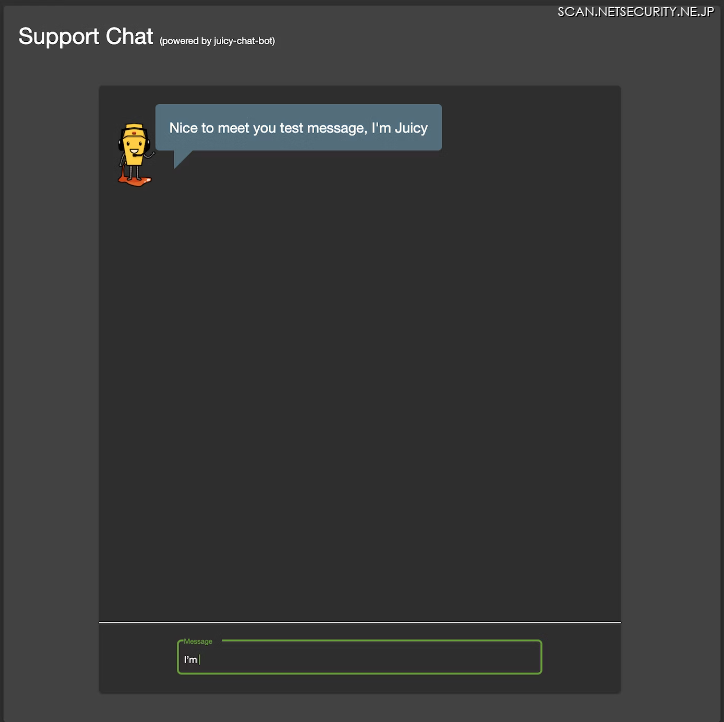
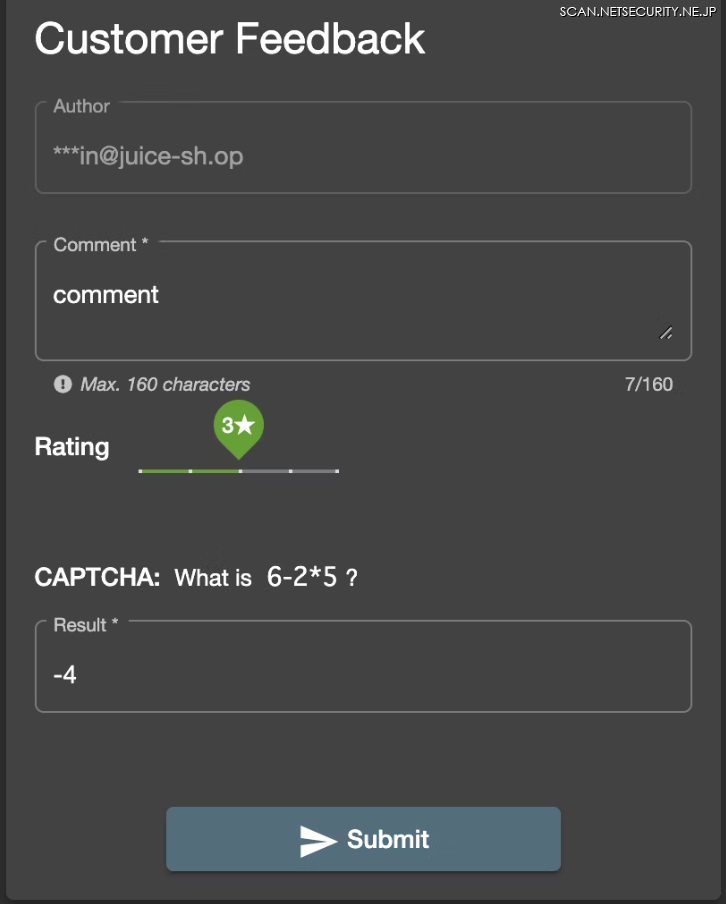
OWASP Juice Shop にはマウス操作やキー押下をしないと巡回できない機能が複数あります。
・検索実行には Enterキーの押下が必要

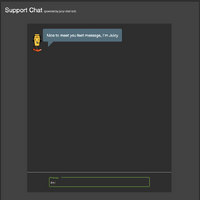
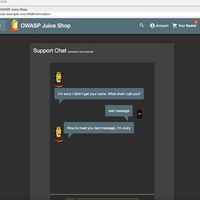
・チャット投稿には Enterキーの押下が必要
・Rating指定にはマウス操作が必要
これらの機能を巡回するためには、マウス操作やキー押下をブラウザ上で実行する必要があります。
AeyeScan の巡回エンジンは、Enterキーの押下、スライダーのマウス操作、スクロールバー付き要素の自動スクロールなどにも対応しており、このような画面も巡回することが可能です。
【チャット投稿機能(AeyeScan巡回結果より)】
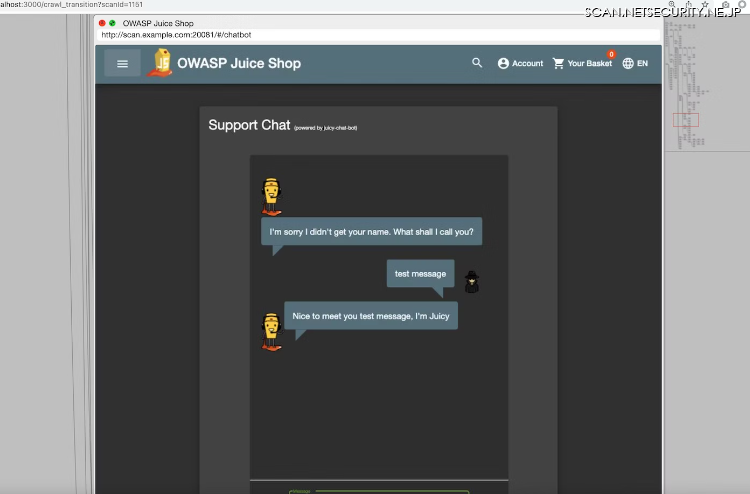
ただし、実行条件の自動判定はとても難しいため、精度には向上の余地があります。
●CAPTCHA突破が必要
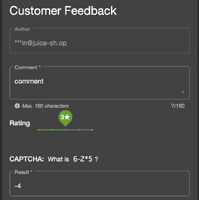
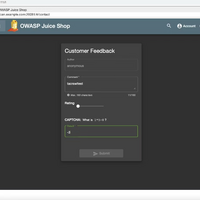
OWASP Juice Shop には CAPTCHA突破が必要な投稿機能があります。
AeyeScan には AI を用いた CAPTCHA突破の基盤があるため、正しい答えを入力することが出来ました。
【CAPTHCA付き入力フォーム(AeyeScan巡回結果より)】
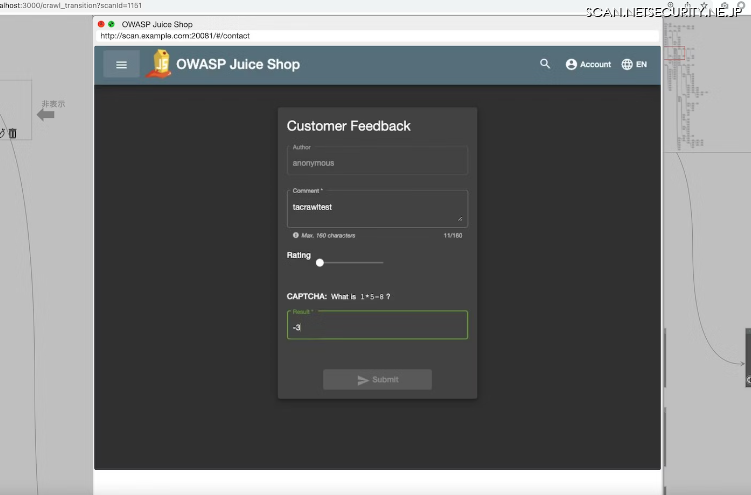
この例は、四則演算の答えを入力する簡易な CAPTCHA ですが、より難易度の高い画像CAPTHCA も突破することが可能です。画像CAPTHCA の突破技術については、深層学習で CAPTCHA突破の記事で解説しています。
●モーダルが多い
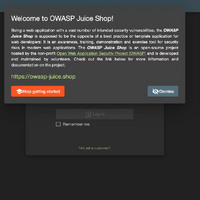
ブラウザベースのクローラーは、ブラウザに描画された入力フォームやボタンを操作するという特性から、モーダルの扱いが大きな課題になります。操作対象の要素とモーダルが被る場合、要素の操作が上手くいかないためです。
【フォームの上にモーダルが表示される場合、フォームに値を入力できない】

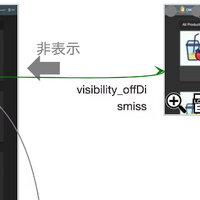
AeyeScan では、「モーダルを自動判定しモーダルの中身を優先的に巡回する」「モーダルの中身の巡回が終わったら、モーダルを閉じてから巡回を継続する」という方法でこの課題を解決しています。
【モーダルを閉じてから巡回する例(AeyeScan巡回結果より)】
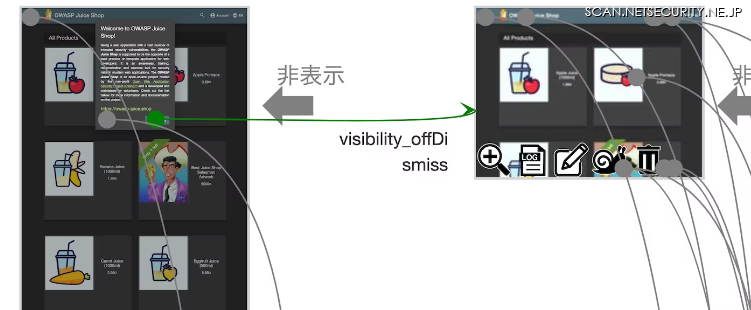
ただし、モーダルの自動判定はとても難しいため、精度には向上の余地があります。
●自動巡回結果
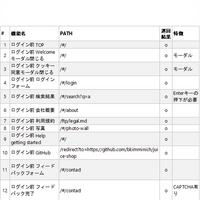
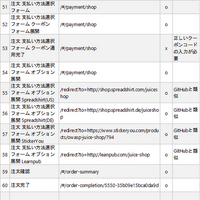
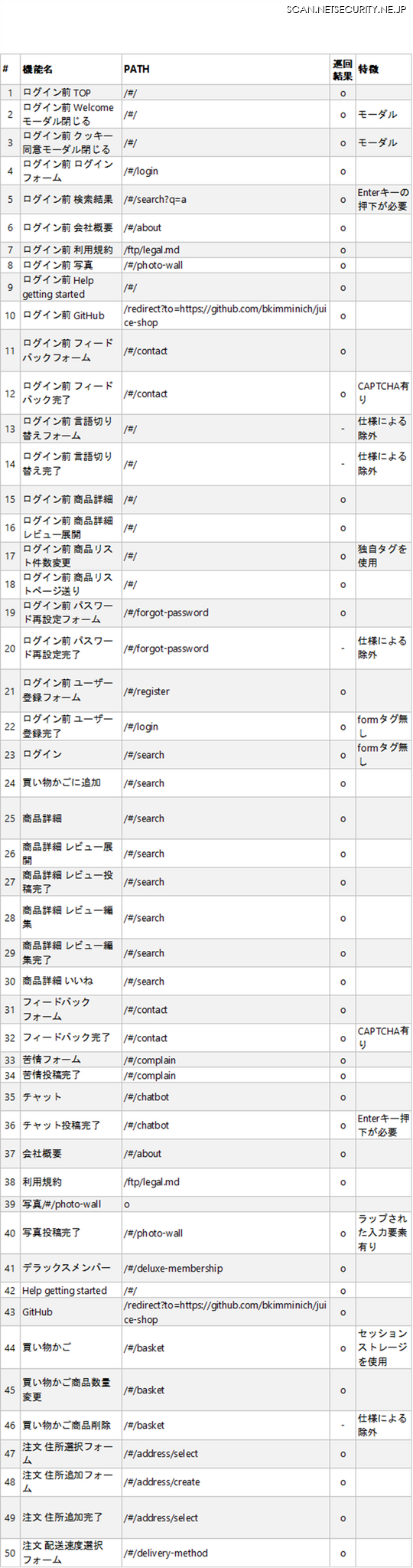
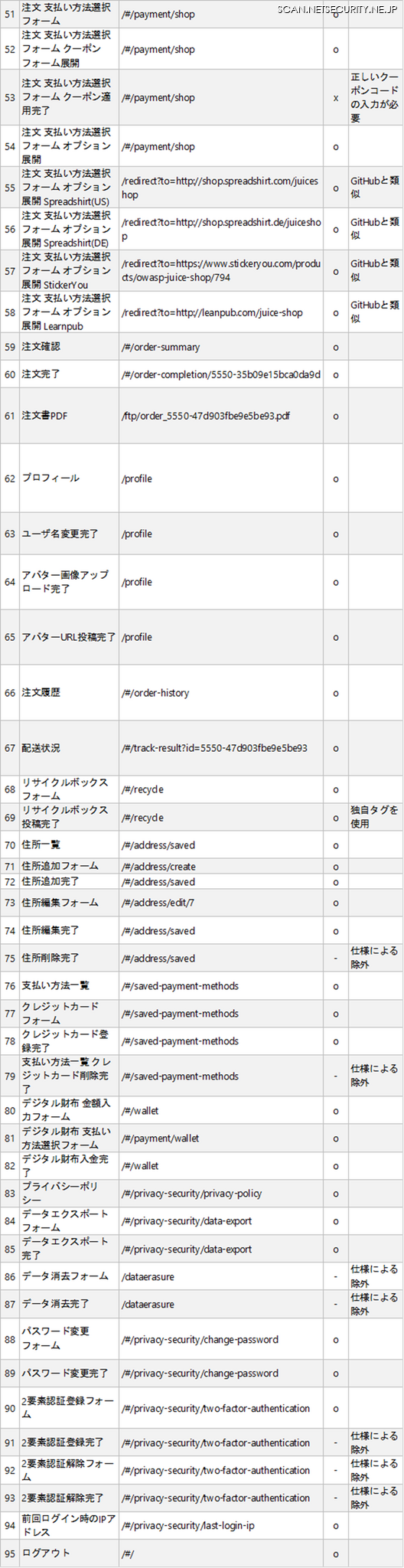
OWASP Juice ShopをAeyeScan で自動巡回した結果を以下にまとめます。
AeyeScan は 2022/6/24 リリースの最新バージョンを使用しました。
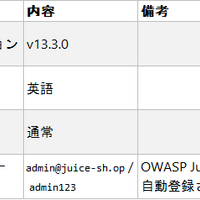
●巡回設定
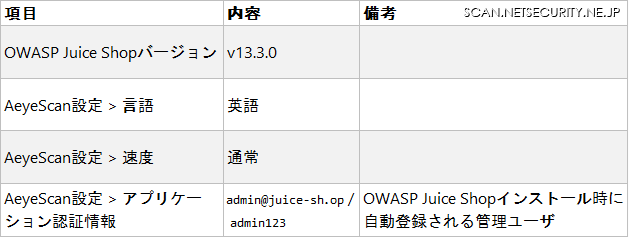
●巡回結果
ほぼ全ての画面を高速に見つけ出すことが出来ました!
・巡回時間: 11 分
・巡回画面数: 150 画面
・巡回率: 99 %(削除系の機能など仕様により巡回しないページを除く)」
【機能一覧と巡回結果(重複除く)】
●おわりに
以上、OWASP Juice Shop を例に AeyeScan の自動巡回技術の一部を解説しました。
本記事では触れなかったスキャン結果については、別の機会に改めて解説したいと思います。
AeyeScan のトライアル、脆弱性診断の自動化のご相談はこちら
弊社ではエンジニア採用を実施中です。自動巡回技術に興味を持った方からのご応募もお待ちしています。